Outstreched arm

Friday, November 10, 2006

Enabling the "Edit in external editor" menu option in iPhoto

While iPhoto is neat for basic photo editing, I primarily use Photoshop for serious adjustments (love that Shadow/Highlight tool). I was surprised to find that when I Ctrl-clicked my photos, the "Edit in external editor" option was grayed out. Here's how to set it up.

In iPhoto Preferences, under General, set "Edit photo:" to "External editor" (this controls what happens when you double-click thumbnails). Pick Photoshop (or whichever application you plan to use). Close Preferences.

Now, I normally set this option to "Using full screen" because it's a very smooth, distraction-free environment for basic tweaking. We set the above option just so it would show up in the context menu when Ctrl-clicking a photo. Try it now - "Edit in external editor" will be available.

You can now go back to Preferences and change the "Edit photo" option to anything else - the external editor has been set and the option will always be available.

Labels: , , , ,

What do iTunes star ratings mean to you?

Rating things on a five-point scale is never easy, yet it's a system convenient enough that film critics, wine connoisseurs, and Rolling Stones all over the world use it. Here's what I mean when I rate songs in iTunes (this also applies to rating photos in iPhoto and similar systems):

[no rating]    I never got around to rating this song, or I haven't made up my mind yet. This should be looked into.

There is something wrong with this song. It's terrible, or the file is broken, or the tags are wrong, or it's some 45-minute experimental piece. In any case, I don't want it to shuffle on or show up in my playlists and I should look into why it's in my library at all.
This is a bearable song. I don't hate it; if it comes on, I'll likely skip it, but it's basically earned its stay in my music library.

This is a good song. I want to hear it here and there even if it's not exactly a favorite.

This song is sweet. I want to hear it frequently and it's very unlikely that I'll skip it or remove it. (Note: songs often flip between three and four stars)

This is a classic. It's either a masterpiece or a track very dear to me. I want to hear it, but careful with it - it may play too often. This should be used sparingly.

Labels: , , , ,

Tuesday, November 07, 2006

Google/Blogger labels vs. Flickr tags

I was very pleased to see the new Blogger Beta, integrated with Google Accounts and adding some new capabilities. The features aren't killer and they won't convert anyone from Wordpress or Movable Type, but I was happy because it showed that Google wasn't burying Blogger (an impression I'd gotten from its complete stagnation for more than a year).

One feature any self-respecting web service of 2006 should have is tags, and Blogger now has them in the form of "labels", previously seen in Gmail, Google Reader, Google Bookmarks, and others - well, kind of. There are differences between Flickr's approach and Google's. Here's a quick overview. Keep in mind that Google's labels are still implemented inconsistently and spottily.

  • Flickr tags are completely ad hoc; they can be added to existing items with the fewest clicks possible.

  • Google's labels are, for the most part, defined ahead of time, then applied to items. The new Blogger labels can be created on the fly, however.

  • Flickr tags can be created by other users, not just the author. There is no such functionality with Google labels for now.

  • When entering more than one tag on Flickr, you can space-separate them; for instance, type in cat animal pet to add those three tags. Multi-word tags are quote-enclosed; for instance, cat "mister paws" pet, though it appears that the better way to do it is to just runthewordstogether since this happens to quoted multi-word tags anyway.

  • In Blogger, you comma-separate tags. This allows you to enter mac, apple ipod, but it confused me at first so I ended up with giant single tags like apple mac ipod tech nerd software. Personally, i prefer the ease of entering of Flickr tags.

Overall, Flickr has a better, simpler, more thoroughly implemented tagging system. Google's just getting started, though; once their labels - and, personally, I also prefer the term "tag" - are used across their services in some interchangeable way, I foresee good things.

Labels: , , ,

Friday, November 03, 2006

iPod Shuffle sync speed problem (2G version)

iPod shuffule sync speed problemMy friend Dino wanted a small, no-nonsense music player for jogging and such and I recommended the new Shuffle, out today. It's tiny, it's simple, it's beautiful.

Dino also asked me to show him how to work this in iTunes (he's got a PC and listens to CDs). We hooked it up, picked a playlist of about 20 songs, and hit Autofill...

...and spent the next 10 minutes staring at the "Updating..." screen. It took about 20 seconds to transfer a single song! This definitely smelled fishy, so I resynced the Shuffle with my PowerBook (thinking it was an issue with Dino's USB port), but the slowness persisted.

I found the answer on Apple's support forums, and here it is in case you don't find it there yourself:

When you connect the iPod and click on it under Devices, under the Settings tab, there's a checkbox to "Convert songs to 128 ACC", meaning, to reduce the quality and filesize to fit more songs on the cute li'l thing. Nifty, but also quite unexpectedly slow. Unless you absolutely need loads of songs for your gym run, you'll probably prefer better transfer speeds.

Labels: , , , ,

Redundant product descriptions on RadioShack's website

Where do you look when you need a 12" shielded stereo audio cable, and you can't wait to order online? RadioShack, of course, that street-corner Library of Alexandria of dorktronics. For the most part, the site is usable and its search returns relevant results, nicely presented (unlike, for instance, Best Buy's goofy search). One thing that stands out, though, is the way product descriptions are put together for small, simple objects. For instance:

1/4" mono Panel-Mount Audio Jack (2-Pack)
$2.99
Model: 1/4" Open-frame open-circuit panel mount
Catalog #: 274-252

A pair of jacks.

This open-frame, open-circuit accepts 1/4" mono phone plugs. Package of two.

* Panel-mount
* Open circuit
* Package of 2

What's in the box

* 1/4" Open-frame open-circuit panel mount (2)


Or:

12-Inch Shielded Stereo Audio Cable
$4.99
Model: 42-2497
Catalog #: 42-2497

Put it on the card.

This 12-inch, shielded stereo audio cable will connect audio components to your computer's sound card. It has an 1/8" stereo phone plug on each end. Use it to hook up a speaker system, mini stereo or other components.

* 12-inch stereo audio cable has an 1/8" stereo phone plug on each end
* Connect a speaker system, mini stereo or other components to your computer's sound card

What's in the box

* 12" Shielded Stereo Audio Cable (1/8" stereo phone plug to 1/8" stereo phone plug)


I'm not really complaining - more info is better than less, but it's a little goofy to read.

Labels: , , ,

Wednesday, November 01, 2006

New Pizzle

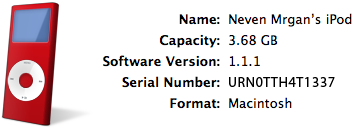
I treated myself to a new iPod Nano (PRODUCT) RED (which is a red iPod Nano product) and I'm loving it - the thing is hilariously small, light, and thin, the battery lasts forever, and the screen is sharper and brighter than Mark Twain.

I'm also liking the new iTunes, version 7. I haven't experienced any problems reported by many others, so I can only recommend it. The new iPod options interface is a very welcome change - the gray dialog box of v.6 was getting very, very cramped. I hope they play with the looks of it a little more to make it less webpage-like (I suggest making it more like the beautiful Apple product pages), but it's a nice little iPod Central.

Another welcome addition is a nice, big picture of my iPod. However, I was ever so slightly disappointed to find that it was a generic gray instead of red like my actual iPod. Couldn't this be figured out from its serial number? C'mon, Apple....

...And sure enough, with yesterday's iTunes 7.0.2 update, this feature was added. Here's what my wine-red little toy looks like in iTunes now:

red iPod in iTunes source list

red iPod in iTunes

Labels: , , , , ,

Friday, September 22, 2006

Kodak CX7430 pictures crash iPhoto...

I've never had this problem in iPhoto, and I've been using it for years with dozens of different cameras: when I tried importing pictures from my friend's Kodak CX7430 today, it silently crashed every time. It didn't matter if I imported one picture at a time or many, and each picture did it. Moving the pictures from the camera to the Mac and then importing didn't fix it either.

I tried re-saving these in Photoshop. No dice - if the problem was with EXIF or other metadata in the files, a simple re-save wouldn't have changed it anyway.

My solution was to create an action that saves an image in the TIFF format, then run it as a batch action on all the images. The TIFFs were imported fine (same thing if I now converted them back to JPEG).

The funny thing is, I've imported pictures from this camera before. The only thing that's different now is that I ran the fifth 2006 Security Update just last night.

Labels: , , ,

Thursday, January 12, 2006

RAZR iSyncing with a Mac

After a long period of thorough dissatisfaction with Cingular's plans, phones, and cellphone and customer service, I switched to T-Mobile, acquiring in the process a RAZR V3. I had wanted one because the lack of a speakerphone and Bluetooth connectivity on my old Nokia were getting to be rather annoying. I'm not a cellphone junkie so I'm still playing with the phone, but I thought I'd share some advice regarding Bluetooth syncing with a Mac using iSync.

The first problem I ran into was with iSync itself - when started, iSync looked like an iCar had hit it (bad joke). The window was messed up and the buttons functioned erratically. I then realized what had happened - for some reason, I had moved the application from its god-given place in /Applications/Utilities, and when the OS X Tiger 10.4.4 update ran, I ended up with two conflicting versions. After some random erasing, reinstalling, and rebooting (no, really, it was nearly random) I had a working copy of iSync again. So while I can't tell you how to fix yours if it breaks, I'll advise you not to move system apps from their original locations.

Next, there was the matter of deciding whether to store my contacts on the SIMM card or the phone itself; this was quickly decided by the sync process itself, which stored everything on the phone. No problem; more features are available on the RAZR that way anyway (voice dialing, etc.) So, to sync, go to your Bluetooth options under System Preferences, and set up a new device. This should be pretty painless.

The next problem I had was contacts with multiple phone numbers and email addresses being listed as separate entries on the phone - silly. I know people with 3 phone numbers, 3 emails, and several IM names; I don't want 10 Phonebook entries for one person. Luckily, you can consolidate them, though it's not intuitive. On the phone, go to Phonebook > Phonebook menu (middle button) > Setup, and change View to Primary Contacts. Now you can assign, for each contact, which datum to use as their primary contact information.

I'm still disappointed that contacts' pictures don't get transferred from my Mac Address Book to the RAZR. I sent all the pictures to the phone via Bluetooth file send and manually assigned them - a bit of a pain, but I suppose it's not crucial information anyway. I hope all this helps someone!

P.S. Note that in order to sync, you have to store yur info on the phone, not the SIMM, which leads me to conclude, against all groaning, that the process can be described as... "sync or SIMM."

Labels: , ,